



If you want to learn IQ Option without risking real money, start with the demo.
IQ Option calls this a Practice account. It uses virtual funds and lets you train on the same platform layout you will use later.
In this guide, you will learn how to open the demo, switch to it inside the platform, use it on web or mobile, and reset your balance when you need more virtual funds.
Open The Practice Account
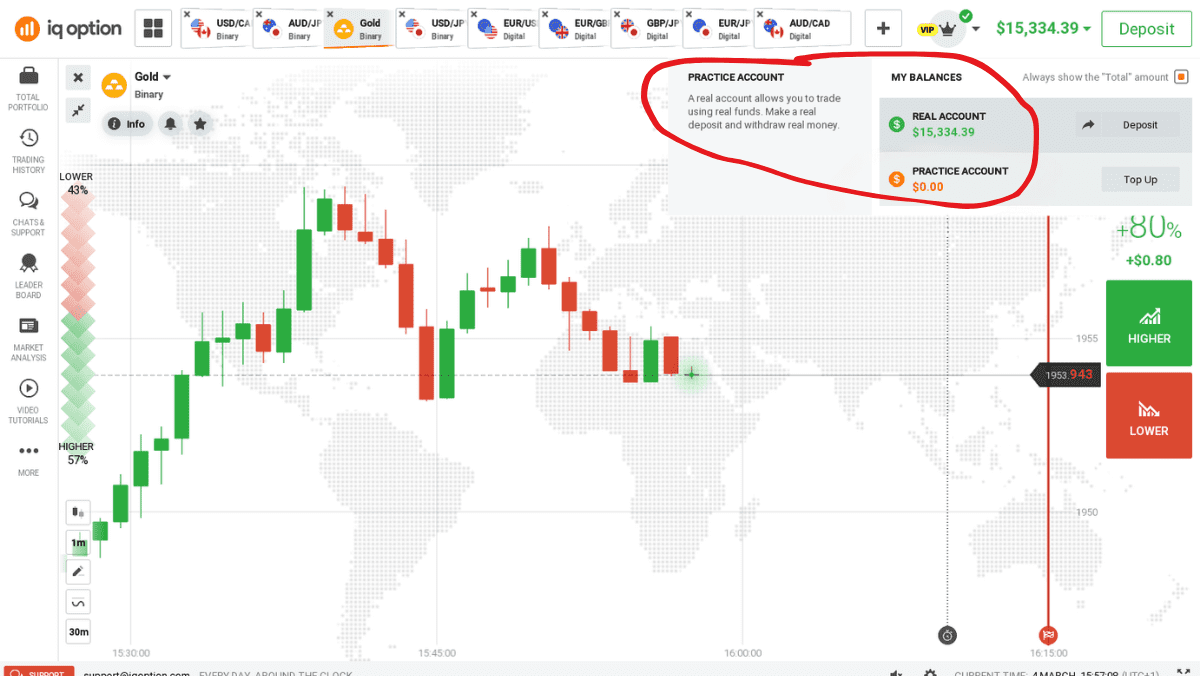
IQ Option does not make you create a separate demo profile. The Practice account sits inside your main account.
You log in once, then switch between balances inside the platform. IQ Option also explains that Practice uses virtual funds and works for training.
Here is the simple start process:
- Go to IQ Option and create an account, or log in if you already have one
- Enter the trading room after you log in
- Look for your balance at the top of the screen
- Click the balance area to choose Practice
What To Look For On Screen
IQ Option notes a visual cue in the interface: the Practice balance shows in orange, while the Real balance shows in green.
Use this as your quick safety check before you do anything on the platform.
Use Web Or Mobile
You can access the demo from a browser or from the mobile app. Pick the option that matches how you plan to trade later.
If you expect to trade on a laptop, practice there first. If you plan to trade on your phone, test the app early so you learn the layout.
On iOS, IQ Option’s App Store listing highlights a demo account with a free, reloadable $10,000 balance, and it says you can switch between demo and real accounts inside the app.
Use this quick device checklist:
- Turn on auto updates for your browser or app
- Keep your login details saved securely
- Disable heavy browser add-ons if the platform loads slowly
- Use stable internet before you place practice trades
Switch To Demo Inside The Platform
Most people get stuck at one point.
They log in and assume they already sit in demo mode. Do not guess. IQ Option says you can switch by clicking your balance and selecting Practice or Real.
A Safe Habit That Prevents Mistakes
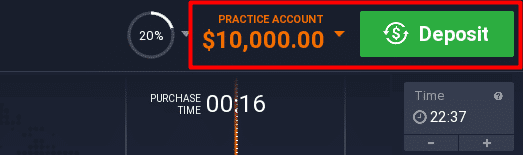
Before every session, do this in order:
- Click your balance
- Select Practice
- Confirm the Practice balance shows on screen
- Only then start testing trades
If you also plan to use real money later, IQ Option’s FAQ makes the key difference clear: Practice trades stay virtual, while real trading requires real funds.
That sounds obvious, but it helps you keep the right mindset when you train.
Reset The Demo And Train With A Plan
A demo works best when you run it like a short training program. Do not click around with no goal. Set one skill to practice, then review what happened.
IQ Option describes the Practice account as training with virtual funds.
The app listing also calls the demo balance reloadable, which supports the idea that you can top it up if you run it down.
Here is a simple plan that keeps you focused:
- Learn the chart tools and time frames
- Place small practice trades to learn the buttons
- Track why you entered, why you exited, and what you felt
- Review your history at the end of each session
Only move to real trading after you can follow your own rules for a full week in demo. If you cannot stay consistent with virtual funds, you will not stay consistent with real money.
Frequently Asked Questions
Can I Use the Demo Without Verifying My Account?
Yes. IQ Option’s Practice account uses virtual funds, so you can explore charts, place practice trades, and learn the interface without completing verification first.
Verification usually becomes relevant when you want to use real money features, especially withdrawals. If the platform prompts you for extra details during signup, follow the steps, but you can still train in Practice mode today.
How Do I Refill the Practice Balance if I Run Out of Funds?
Open the trading room, click your balance, and switch to the Practice account. Then choose the Top Up option to refill your demo funds.
IQ Option commonly sets the practice balance around $10,000 and lets you reload it when your balance drops below that level. If you do not see Top Up, refresh the page or restart the app once.
Is the Demo Balance Always $10,000?
Many IQ Option materials describe the demo as a $10,000 Practice balance and call it reloadable. Still, the exact starting amount and labels can vary by region, platform version, or promotions.
The safest approach is simple: log in, switch to Practice, and read the balance shown at the top of your screen. That number is what you have available there.
How Can I Tell if I’m in Demo or Real Mode Before I Place a Trade?
Before you place a trade, check the balance area at the top of the platform. Make sure it says Practice, not Real.
IQ Option uses a color cue: Practice balance appears in orange, while Real balance appears in green. Build a habit: confirm the label and color first, then place orders. If anything looks unclear, stop and switch accounts again.
Conclusion
To access the IQ Option demo, log in and switch to the Practice account from the balance menu. Use the color cue on screen to confirm you are in demo mode.
Then decide if you want to train on web or mobile and stick to one setup until it feels natural.
Reset your virtual balance when you need to, and follow a simple practice plan so each session teaches you something useful.