


Most charting platforms focus on price first and everything else second.
GoCharting takes a slightly different path by putting market profile, volume, and order-flow style tools closer to the center of the experience.
This GoCharting review looks at how the platform works in real trading workflows, who benefits most from it, and where it still feels less polished than bigger names.
It’s not trying to replace every platform, but for certain traders, it fills a specific gap.
What GoCharting Is Built Around
GoCharting is a web-based charting and analytics platform designed with auction market theory in mind.
While it still offers standard candlestick charts and indicators, its core appeal is how it handles volume-based analysis.
The platform is commonly used by futures traders, crypto traders, and technically focused day traders who want more than simple indicators.
It runs directly in the browser, which makes it easy to access without installing heavy software. What stands out early is that GoCharting doesn’t feel social or flashy.
It feels analytical. Charts are dense with information, and the platform assumes the user understands at least basic trading concepts.
Market Profile and Volume Tools
Market profile is where GoCharting really earns attention. The platform offers strong support for TPO profiles, volume profiles, and session-based analysis.
Instead of looking at price alone, traders can see how the market distributed volume over time. This helps answer questions like where acceptance happened and where the price moved too quickly.
GoCharting allows:
- Session-based profiles
- Fixed-range and visible-range volume profiles
- Value area, POC, and distribution shapes
- Custom session definitions
These tools are especially useful for futures traders who rely on context rather than indicators. You can quickly see whether price is trading in balance or exploration, which influences trade selection significantly.
Order-Flow Style Features Without Full Depth
GoCharting sits in an interesting middle ground when it comes to order flow. It is not a full order-book platform like Bookmap, but it goes further than traditional charting tools.
You can work with:
- Volume footprint-style charts
- Delta and bid/ask data
- Volume imbalances
- Session-level volume statistics
This gives traders insight into participation and aggression without needing a full DOM-based environment.
For many traders, this is enough to confirm entries or exits without overwhelming them with microstructure detail.
That said, traders expecting live liquidity heatmaps or deep order-book visualization may feel limited. GoCharting focuses more on volume behavior than resting liquidity.
Charting Experience and Customization
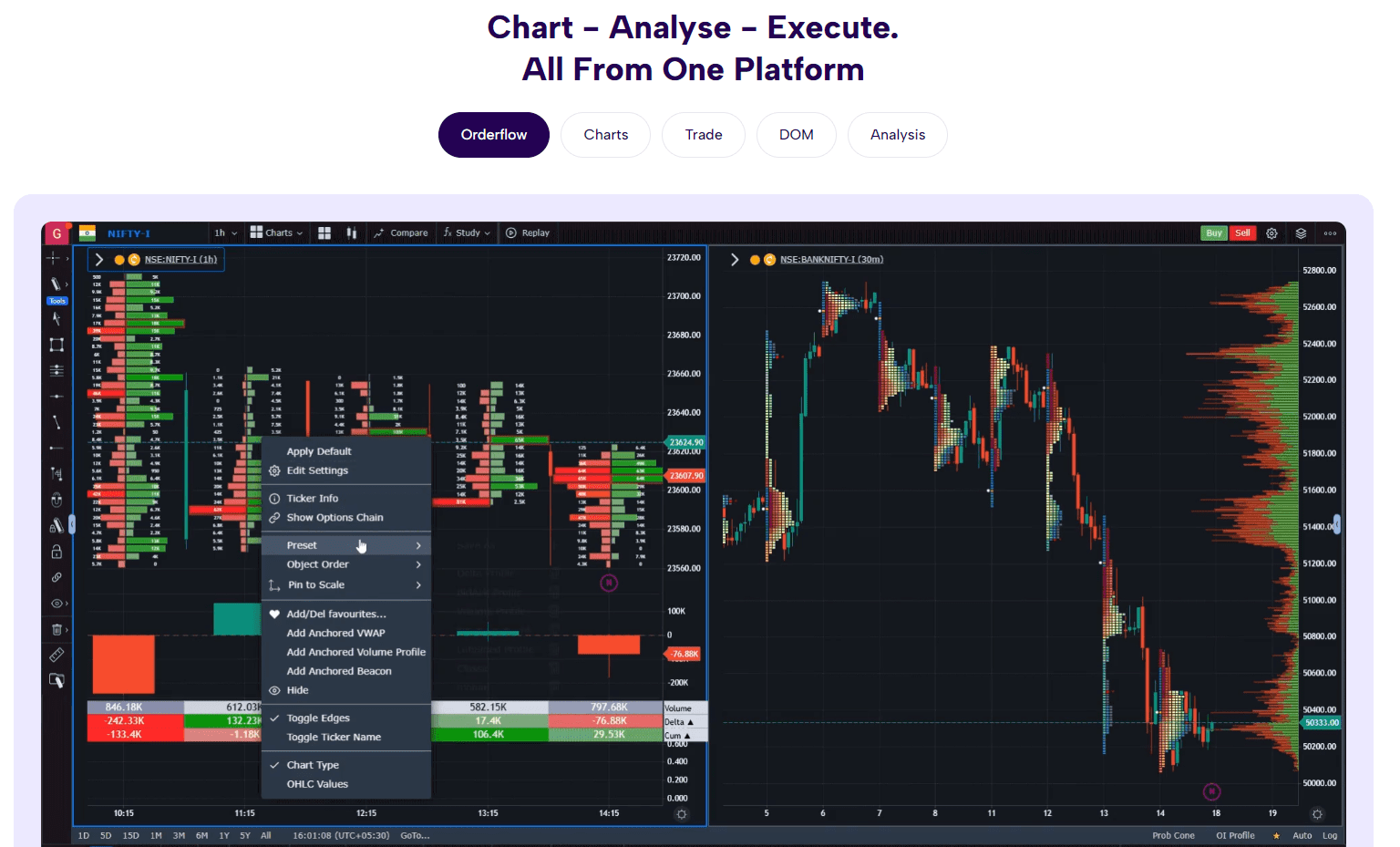
The charting experience in GoCharting is functional rather than polished. Charts are responsive, and customization options are deep, but the interface can feel busy at first.
Layouts can be adjusted to show multiple charts, profiles, and indicators at once.
This is useful for traders who want context-rich views, but it also means beginners may need time to organize their workspace.
Indicators are available for:
- Trend and momentum
- Volume-based signals
- Volatility
- Market internals
Most traders using GoCharting rely less on indicators and more on structure and volume, which fits the platform’s design philosophy.
Asset Coverage and Data Quality
GoCharting supports multiple asset classes, including crypto, forex, and futures.
Crypto coverage is broad and works well for major pairs. Futures traders also benefit from session-aware tools that align with how those markets trade.
Data quality is generally solid for analytical purposes. Profiles build correctly, and volume metrics behave as expected.
For most traders, the data is reliable enough to base decisions on.
It’s important to understand that GoCharting is focused on analysis, not execution. It does not try to simulate broker fills or advanced execution conditions.
Who GoCharting Is Best For
GoCharting works best for traders who already understand market structure and volume concepts. It is not designed as a learning-first platform.
Best fit:
- Futures traders using market profile
- Crypto traders who rely on volume context
- Traders applying auction theory
- Traders who prefer analytical depth over simplicity
Less suitable for:
- Beginners learning basic charting
- Traders who rely heavily on social ideas
- Pure indicator-based scalpers
- Traders needing execution tools
If your strategy depends on understanding how price interacts with volume over time, GoCharting fits naturally.
Learning Curve and Daily Use
The learning curve is moderate. Traders familiar with market profile adapt quickly, while others may need time to understand what the data actually means.
In daily use, GoCharting works best as a primary analysis tool rather than a secondary reference. Traders often build their bias using profiles and volume context, then execute trades on a separate platform.
Once layouts are set up properly, the workflow becomes efficient. The key is not trying to use every feature at once.
Frequently Asked Questions
Is GoCharting Suitable as a Replacement for Advanced Order-Flow Platforms?
GoCharting is not a full replacement for advanced order-flow platforms. It focuses on volume behavior and market profile rather than live order-book depth. Many traders use it as a lighter alternative when they want context without the complexity of full liquidity visualization.
Does GoCharting Support Custom Indicators or Scripting?
GoCharting offers a growing set of built-in indicators, but its custom scripting options are limited compared to platforms like TradingView. It is designed more for structured analysis using predefined tools rather than for building fully custom indicators from scratch.
How Well Does GoCharting Handle Intraday Futures Sessions?
GoCharting handles intraday futures sessions well, especially for traders using session-based market profile analysis. Custom session settings allow traders to align profiles with exchange hours, which helps maintain accuracy in volume and value area calculations.
Can GoCharting Be Used on Low-Powered Devices or Laptops?
Yes, since GoCharting runs in a browser, it generally performs well on standard laptops. However, charts with multiple profiles and volume tools can be resource-intensive, so performance may decrease if heavy analytical features are used simultaneously.
Final Thoughts
GoCharting is a focused platform built for traders who care about volume, structure, and context. It doesn’t chase popularity or social features, and it doesn’t try to be everything at once.
Instead, it provides serious analytical tools that reward traders who understand what they’re looking at.
For market profile and volume-focused traders, GoCharting can be a strong daily companion when used with realistic expectations.